

Ever wondered why your code sometimes behaves unexpectedly? The answer often lies in understanding JavaScript data types. Whether you’re a student just starting your coding journey or a parent helping your child learn programming, grasping the different types of JavaScript is essential for writing clean, bug-free code.
In this guide, we’ll walk you through the eight JavaScript data types in a way that’s easy to understand and apply. By the end, you’ll know exactly what each type does, when to use it, and why it matters for your programming success.
Let’s dive into the building blocks that make JavaScript work!
What Are the 8 JavaScript Data Types?
JavaScript has exactly eight data types that every developer needs to know. Think of
these as different containers for storing different kinds of information in your code. Just
like you wouldn’t store milk in a paper bag, you need the right data type for the right kind
of information.
The eight JavaScript data types are divided into two main categories: primitive types
and reference types. The seven primitive data types are String, Number, Boolean, Undefined,
Null, Symbol, and Biglnt. The one reference type is Object, which includes arrays,
functions, and other complex data structures.
Let’s break down each type with real-world examples you can relate to:
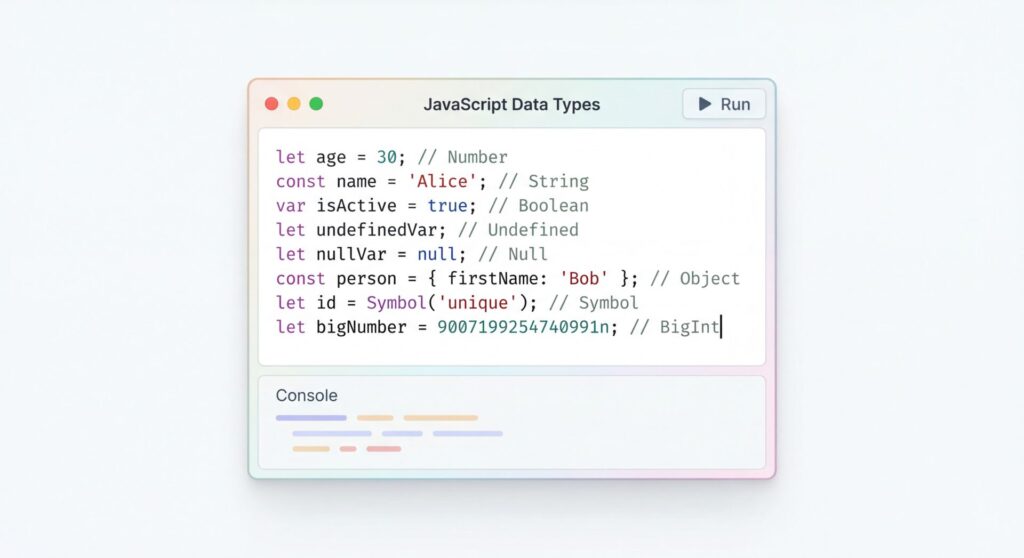
1. String: This type stores text data, like names, messages, or any sequence of characters.
When you type your name into a form online, that’s stored as a string. In JavaScript,
strings are wrapped in quotes: “Hello, World!” or ‘JavaScript is fun!
2. Number: Unlike some programming languages that distinguish between integers and
decimals, JavaScript uses one Number type for all numeric values. Whether you’re
calculating grades (85), measuring temperature (98.6), or counting students (42), it’s all
the Number type in JavaScript.
3. Boolean: This is the simplest data typeit’s either true or false. Think of it like a light
switch: it’s either on or off. Booleans are crucial for making decisions in your code, like
checking if a student passed an exam or if a user is logged in.
4. Undefined: When you create a variable but don’t assign it a value yet, JavaScript
automatically gives it the value undefined. It’s like having an empty box with a label but
nothing inside yet.
5. Null: This represents an intentional absence of value. While undefined means “I haven’t
set this yet,” null means “I’m deliberately setting this to nothing.” It’s the difference
between an empty box you haven’t filled and an empty box you intentionally left empty.
6. Symbol: Introduced in ES6 (2015), Symbols create unique identifiers that are guaranteed
to be different from any other symbol. They’re particularly useful for creating unique
property keys in objects. As of 2026, Symbols are widely used in modern JavaScript
frameworks and libraries.
7. BigInt: Added in ES11 (2020), BigInt allows you to work with integers larger than the
Number type can safely handle. Regular numbers in JavaScript can accurately represent
integers up to 2^53 – 1, but BigInt can go way beyond that-perfect for financial
calculations or scientific computing.
8. Object: This is the only reference type and the most versatile. Objects can store
collections of data and more complex entities. Arrays, functions, dates, and even regular
expressions are all objects under the hood.
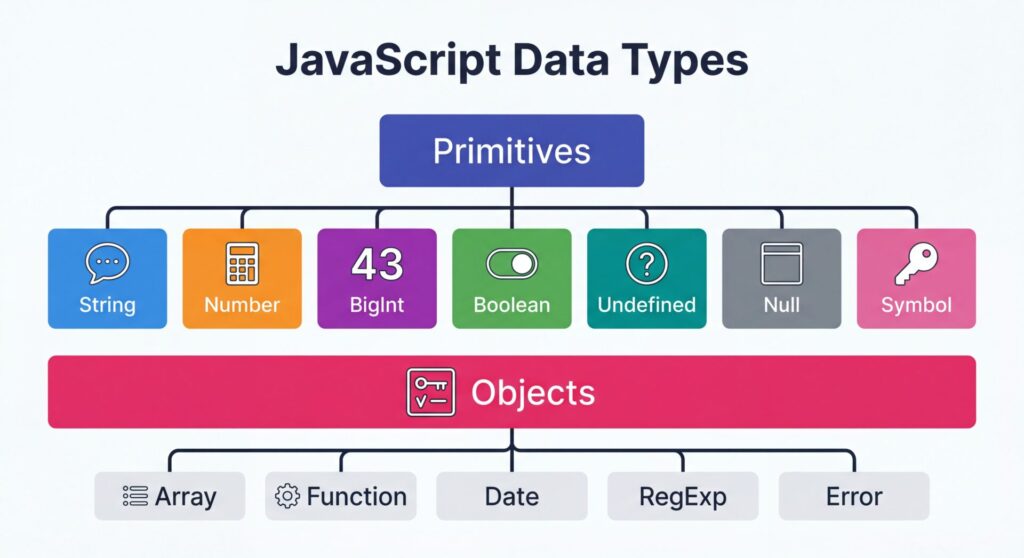
Here’s a quick comparison table to visualize the differences:
| Data Type | Category | Example | Use Case |
|---|---|---|---|
| String | Primitive | "Educify" | Text, names, messages |
| Number | Primitive | 42 or 3.14 | Calculations, measurements |
| Boolean | Primitive | true or false | Conditional logic |
| Undefined | Primitive | undefined | Uninitialized variables |
| Null | Primitive | null | Intentionally empty |
| Symbol | Primitive | Symbol("id") | Unique identifiers |
| BigInt | Primitive | 9007199254740991n | Large integers |
| Object | Reference | {name: "John"} | Complex data structures |
Understanding these eight types is your first step toward mastering JavaScript
programming. Each type serves a specific purpose, and knowing when to use each one
will make your code more efficient and easier to debug.
What Are the Two Main Data Types in JavaScript?
Now that you know all eight types, let’s zoom out and look at the bigger picture.
JavaScript organizes these eight types into two fundamental categories: primitive data
types and reference data types. Understanding this distinction is crucial because it
affects how JavaScript handles your data in memory and how your code behaves.
Primitive Data Types are the basic building blocks. They include String, Number,
Boolean, Undefined, Null, Symbol, and BigInt-that’s seven out of our eight types. What
makes them “primitive” is how they’re stored and accessed in your computer’s memory.
When you create a primitive value, JavaScript stores the actual value directly in a
location called the “stack.” Think of the stack as a neat filing cabinet where each drawer
contains the exact value you stored. When you copy a primitive value to another
variable, JavaScript creates a completely separate copy. It’s like photocopying a
document-you now have two independent copies.
Reference Data Types work differently. There’s only one reference type in JavaScript:
Object. But don’t let that fool you-objects are incredibly versatile. Arrays, functions,
dates, maps, sets, and regular objects all fall under this category.
Reference data types are stored in a different part of memory called the “heap.” Instead of
storing the actual data directly in your variable, JavaScript stores a reference—basically
an address that points to where the real data lives. It’s like storing a GPS coordinate
instead of moving an entire house.
Here’s why this distinction matters in real-world programming:
1. Memory Efficiency: Reference types allow multiple variables to share the same data
without duplicating it, saving memory when working with large datasets.
2. Performance: Copying a reference is much faster than copying an entire object, which is
why JavaScript uses this approach for complex data.
3. Mutability: Reference types can be changed after creation, while primitive types create
new values instead of modifying existing ones.
Understanding the difference between primitive and reference data types helps you predict
how your code will behave, especially when passing data between functions or
managing state in applications. It’s a fundamental concept that separates beginners from
confident JavaScript developers.
What Are the Four Basic Data Structures in JavaScript?
When you’re building real applications, you need ways to organize and manage multiple
pieces of data efficiently. That’s where JavaScript data structures come in. While
JavaScript technically has eight data types, four fundamental data structures stand out
as the most commonly used: Objects, Arrays, Maps, and Sets.
Let’s explore each one and understand when you’d use them in your projects.
Objects: The Swiss Army Knife of Data Structures
Objects are the most versatile data structure in JavaScript. They store data as key-value
pairs, making them perfect for representing real-world entities. Think of an object as a
digital filing cabinet where each drawer has a label (the key) and contains information
(the value).
Objects are ideal when you need to represent something with multiple properties, like a
user profile, a product in an e-commerce store, or a student record. You can access the
data using dot notation (student.name ) or bracket notation (student[“age”] ).
Arrays: Ordered Lists for Sequential Data
Arrays are ordered collections that store multiple values in a single variable. They’re
perfect when the order of your data matters or when you need to work with lists of
similar items.
Arrays come with powerful built-in methods like map(), filter(), and reduce() that
make data manipulation easy. According to recent trends in 2026, functional
programming with array methods has become the standard approach for modern
JavaScript development.
Use arrays when you’re working with lists of items, need to maintain order, or want to
iterate through data sequentially.
Maps: Key-Value Pairs with Superpowers
Maps are similar to objects but with some important advantages. Introduced in ES6,
Maps can use any data type as keys (not just strings), maintain the order of entries, and
provide better performance for frequent additions and deletions.
Maps are perfect when you need to frequently add or remove entries, when key order
matters, or when you need keys that aren’t strings. They’re becoming increasingly
popular in 2026 for managing application state and caching data.
Sets: Unique Collections Made Simple
Sets store unique values-no duplicates allowed. They’re incredibly useful when you
need to ensure uniqueness or quickly check if a value exists in a collection.
Sets are ideal for removing duplicates from arrays, tracking unique visitors, or
implementing features like tags or categories where each item should appear only once.
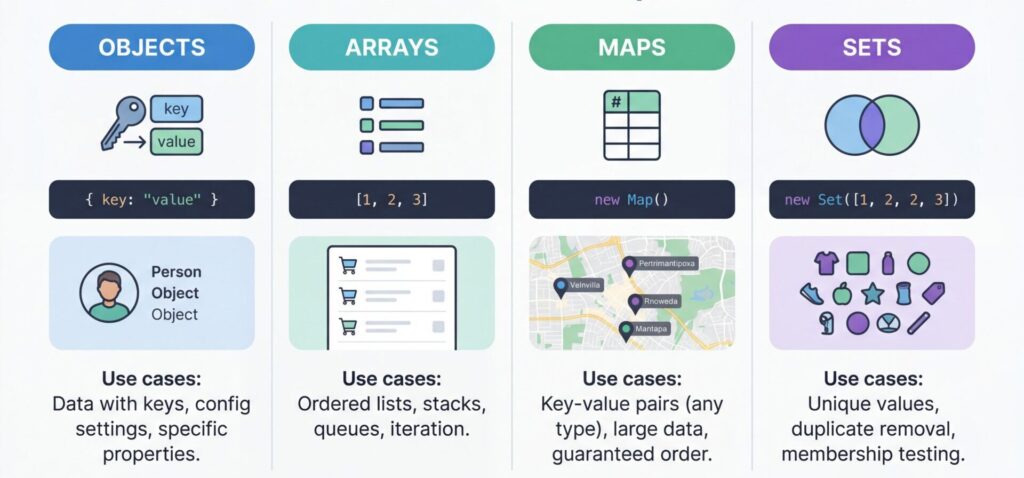
Here’s a comparison table to help you choose the right JavaScript data structure:
| Structure | Ordered | Unique Values | Key Types | Best For |
|---|---|---|---|---|
| Object | No | No | Strings/Symbols | Structured data with named properties |
| Array | Yes | No | Numeric indexes | Sequential lists, ordered collections |
| Map | Yes | Keys only | Any type | Key-value pairs with non-string keys |
| Set | No | Yes | N/A | Unique collections, duplicate removal |
| 📊 TypeScript became the #1 language on GitHub in 2025 – TypeScript Growth | ||||
Understanding these four data structures gives you the tools to organize data efficiently in any JavaScript project. As you gain experience, you’ll develop an intuition for which structure fits each situation. The key is practicing with real examples, something we love helping students do at Educify!
Why Are Javascript Data Types Important?
You might be wondering, “Why do I need to care about data types? Can’t I just write
code and let JavaScript figure it out?” While JavaScript is forgiving and flexible,
understanding data types is absolutely critical for writing professional, bug-free code. Let me explain why.
1. Preventing Bugs and Unexpected Behavior
JavaScript’s flexibility can be both a blessing and a curse. Because it’s a dynamically
typed language, you don’t need to declare types explicitly-but that means you can
accidentally mix types in ways that cause problems.
2. Memory Management and Performance
Different JavaScript data types use memory differently. Primitive data types are stored on the stack and are fast to access. Reference data types live on the heap and require more memory
management. When you’re building applications that handle lots of data-like a student
dashboard with thousands of records-choosing the right data type affects your
application’s speed and efficiency.
In 2026, with web applications becoming increasingly complex, performance
optimization starts with understanding how your data is stored and accessed. Modern JavaScript frameworks like React and Vue rely heavily on efficient data type usage to maintain fast rendering speeds.
3. Type Coercion and Comparison
JavaScript automatically converts types in certain situations (type coercion), which can
lead to confusing results if you don’t understand the underlying types. Professional developers use strict equality ( === ) specifically because it checks both
value and type, preventing type coercion surprises.
4. API Integration and Data Exchange
When you’re working with APls, databases, or external services, data types become
crucial. JSON (JavaScript Object Notation), the standard format for data exchange on
the web, has specific type requirements. Sending the wrong type to an API can cause
your requests to fail.
For example, if an API expects a number but you send a string, you’ll get errors.
Understanding JavaScript data types helps you properly format data for communication between
systems—a skill that’s essential in 2026’s interconnected web ecosystem.
5. Debugging and Error Messages
When something goes wrong in your code, understanding JavaScript data types helps you interpret error messages and fix problems quickly. Error messages like “Cannot read property of undefined” or “x is not a function” directly relate to type issues. Experienced developers can spot type-related bugs immediately because they understand what each type can and cannot do. This debugging skill dramatically reduces development time and frustration.
6. Building Scalable Applications
As your applications grow, type-related bugs multiply if you’re not careful. This is why
TypeScript-a typed superset of JavaScript-has exploded in popularity. According to
GitHub’s 2025 Octoverse report, TypeScript became the #1 language on GitHub, largely
because adding explicit types prevents entire categories of bugs.
Even if you’re writing plain JavaScript, understanding types helps you write selfdocumenting code that’s easier for teams to maintain and scale.
7. Real-World Impact
Consider a simple e-commerce application. If you accidentally store prices as strings
instead of numbers, your shopping cart calculations will break. If you mishandle boolean
flags for user authentication, you could create security vulnerabilities. If you don’t
properly manage object references, you might accidentally modify shared data across
components.
These aren’t theoretical problems-they’re real issues that cost companies time anp
money. Learning JavaScript data types properly from the start sets you up for success in your
programming career.
Check out related articles on web development:
Conclusion
Understanding JavaScript data types isn’t just about memorizing definitions-it’s about
building a solid foundation for everything you’ll create with code. From the eight
fundamental types to the distinction between primitive and reference values, these
concepts shape how you think about programming and solve problems. Whether you’re
working with simple strings and numbers or complex data structures like Maps and Sets,
knowing your data types helps you write cleaner, faster, and more reliable code.
Remember, every expert developer started exactly where you are now, and mastering
these fundamentals is your first step toward building amazing web applications. Keep
practicing, stay curious, and don’t be afraid to experiment with different types in your
code!
Ready to master JavaScript with expert guidance? Learn JavaScript with personalized
tutoring at Educify today!