
Introduction
JavaScript is often the first programming language people hear about when they start learning how websites work. It powers buttons, forms, animations, and interactive features we use every day. But as learners move beyond the basics, they quickly encounter new terms like JavaScript nodes and Node.js, and that is where confusion usually begins. Many beginners are unsure whether JavaScript and Node.js are the same thing, whether they need Node to write JavaScript, or how JavaScript even runs outside the browser.
This article is written to clear that confusion completely. We will begin by explaining what JavaScript actually is, in simple terms, before gradually moving into JavaScript nodes and how Node.js works. Every section builds logically on the one before it. If you are learning JavaScript for the first time, or you want a clearer mental model of how JavaScript nodes fit into modern development, this guide is designed to give you clarity, not overload.
What Is JavaScript?
Before discussing JavaScript nodes, it is important to understand JavaScript itself without mixing concepts too early. JavaScript is a programming language created to make web pages interactive. When you click a button and something changes instantly without the page reloading, JavaScript is responsible. When a form warns you that a password is too short, JavaScript is working behind the scenes.
Originally, JavaScript could only run inside a web browser. The browser acted as the environment that understood JavaScript code and executed it. This is why beginners often start by writing JavaScript inside HTML files and viewing results in the browser. The browser provides tools like the Document Object Model, which allows JavaScript to interact with page elements such as text, images, and buttons.
Over time, JavaScript evolved beyond simple page interactions. Developers realized that JavaScript was fast, flexible, and easy to write compared to many older languages. As a result, JavaScript began expanding into mobile apps, desktop applications, and server-side programming. This evolution is what eventually led to JavaScript nodes and Node.js.
One reason JavaScript remains popular is its relatively gentle learning curve. Beginners can write useful code quickly, which helps motivation. This learning advantage is similar to why languages like Python are often recommended, as explained in our previous guide on how to learn Python from scratch in 2026. JavaScript shares that beginner-friendly nature but also scales to complex systems.
JavaScript is also deeply connected to how modern applications are built. Most web applications today rely on JavaScript on the front end, and many now rely on JavaScript nodes on the back end as well. Understanding JavaScript clearly before touching Node.js prevents confusion later and allows learners to build skills step by step instead of memorizing disconnected tools.
What Is JavaScript Mainly Used For?
JavaScript is mainly used to make digital experiences interactive, dynamic, and responsive. At its simplest level, JavaScript allows websites to react to user actions. When you click a button, submit a form, or see a content update without refreshing a page, JavaScript is working behind the scenes. This ability to respond in real time is why JavaScript remains a core technology of the web.
Beyond basic interactivity, JavaScript plays a major role in building complete web applications. Frontend frameworks allow developers to create complex user interfaces that feel smooth and app-like. JavaScript handles things like data validation, animations, user input, and communication with servers. This makes websites faster, more engaging, and easier to use.
JavaScript is also widely used outside the browser. With tools like Node.js, JavaScript can run on servers, manage databases, and power backend systems. This is where JavaScript nodes come into play. They allow JavaScript to handle tasks such as processing requests, managing files, and running background jobs without relying on a browser environment.
In addition, JavaScript is used for automation, command-line tools, game development, and even mobile and desktop applications. Because the same language can be used across multiple platforms, developers can reuse skills and logic efficiently. As a result, JavaScript and JavaScript nodes continue to be essential tools for building modern, scalable, and interactive digital solutions.
What Are JavaScript Nodes and Why Node.js Changed Everything
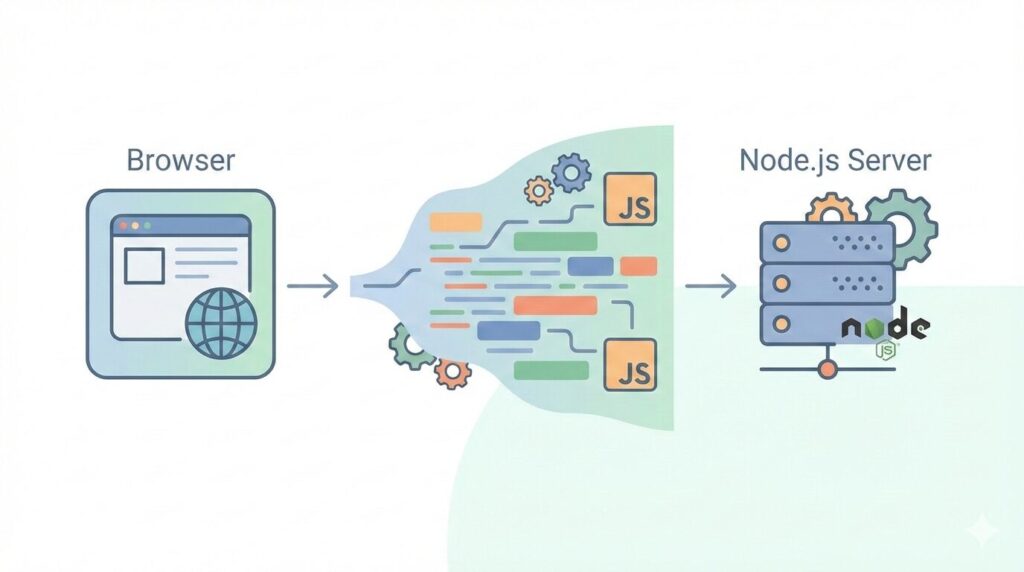
JavaScript nodes refer to the use of JavaScript outside the browser environment, made possible by Node.js. Node.js is not a new programming language. It is a runtime environment that allows JavaScript to run on a computer or server rather than inside a browser.
Before Node.js existed, JavaScript was limited. It could not access files on a computer, communicate directly with databases, or run servers. Those tasks were handled by other languages like PHP, Java, or Python. Node.js removed this limitation by giving JavaScript access to system-level resources.
This change was significant because it allowed developers to use one language across an entire application. JavaScript nodes made it possible to write frontend code for users and backend code for servers using the same language. This reduced context switching and simplified development workflows.
JavaScript nodes are especially powerful because Node.js is event-driven and non-blocking. This means it can handle many tasks at once without slowing down, making it ideal for applications that require real-time updates like chat systems or dashboards.
For learners, JavaScript nodes represent a shift in how programming is approached. Instead of learning multiple languages for different parts of an application, beginners can focus on mastering JavaScript deeply. This aligns with modern learning principles discussed in Educify’s article on the science of learning, where reducing unnecessary complexity improves retention.
Understanding JavaScript nodes also helps learners see the bigger picture. JavaScript is no longer just about buttons and animations. It is about building complete systems, from user interfaces to servers and APIs.
What Is Node.js Used For in Real Applications?
When beginners ask what Node.js is used for, they often expect a single answer. In reality, JavaScript nodes power many different types of applications across industries.
One of the most common uses of Node.js is building web servers. These servers handle requests from users, process data, and send responses back. When you log into a website, submit a form, or load dynamic content, a Node.js server may be handling that logic.
Node.js is also widely used for creating APIs. APIs allow different applications to communicate with each other. For example, a mobile app might request user data from a server built with JavaScript nodes. This separation allows applications to scale and evolve more easily.
Another important use of Node.js is automation. Developers use Node.js scripts to automate tasks like file processing, testing, and deployment. These scripts save time and reduce human error. Automation skills are closely tied to employability, similar to the future-focused skills outlined in 6 essential skills for the future job market in the United States.
JavaScript nodes are also popular in real-time systems. Chat applications, live notifications, collaborative tools, and streaming services rely on Node.js because it handles many simultaneous connections efficiently.
Understanding what Node.js is used for helps learners see why JavaScript nodes matter beyond tutorials. They are not just academic tools. They are used daily by companies building real products.
Is Node.js Easy to Learn for Beginners?
Whether Node.js feels easy or difficult for beginners depends less on intelligence and more on how learning begins. Many people struggle with Node.js because they encounter it too early, before fully understanding JavaScript itself. When learners try to jump straight into servers, files, and backend logic without a solid JavaScript foundation, Node.js can feel overwhelming and abstract. On the other hand, beginners who first understand how JavaScript works find that JavaScript nodes feel like a logical next step rather than a new language.
At its core, Node.js does not introduce a new syntax. It uses the same JavaScript you already write in the browser. What changes is where and how that JavaScript runs. Instead of manipulating buttons and web pages, JavaScript nodes allow you to work with servers, files, databases, and APIs. This shift can feel intimidating, but the concepts themselves are very learnable when explained properly.
Here are the main reasons beginners often think Node.js is hard, and why it does not have to be:
- New concepts require context
Node.js introduces ideas like modules, file systems, servers, and event-driven architecture. These concepts are not complex on their own, but without context they feel confusing. When learners already understand JavaScript functions, variables, callbacks, promises, and asynchronous behavior, these Node.js features start to make sense quickly. - Asynchronous thinking feels unfamiliar at first
JavaScript nodes rely heavily on non-blocking, asynchronous code. Beginners sometimes expect code to run line by line in a strict order. Learning how Node.js handles tasks in the background takes time, but once understood, it becomes one of its biggest strengths rather than a weakness. - Random tutorials slow progress
One of the biggest obstacles to learning JavaScript nodes is jumping between disconnected tutorials. Each resource explains a small piece but assumes knowledge from somewhere else. This creates gaps that lead to frustration. Structured learning paths avoid this problem by introducing Node.js concepts in the correct order and reinforcing them through practice. - Node.js is beginner-friendly by design
Despite its reputation, Node.js is surprisingly forgiving. Error messages are often clear, the community documentation is strong, and there are countless examples available. Beginners who read error messages carefully and experiment regularly often gain confidence faster than expected.
Ultimately, learning JavaScript nodes is not about rushing through lessons or memorizing commands. It is about clarity and sequencing. When JavaScript fundamentals come first and Node.js concepts are layered on top gradually, beginners often find Node.js more approachable than many other backend technologies. With patience and the right structure, Node.js becomes a practical and empowering skill rather than an intimidating one.Do I Need Node.js to Run JavaScript?
This question causes a lot of confusion for beginners, so it deserves a clear and practical explanation. The short answer is no, you do not always need Node.js to run JavaScript. Whether you need Node.js depends entirely on where your JavaScript is running and what you want it to do.
JavaScript was originally created to run inside web browsers. When you write JavaScript for websites, the browser already handles everything for you. Every modern browser, including Chrome, Firefox, Safari, and Edge, comes with a built-in JavaScript engine. This engine reads and executes JavaScript code automatically when a webpage loads. Because of this, beginners can start learning JavaScript without installing any software at all. You can write JavaScript directly inside an HTML file or use browser developer tools to experiment and learn.
Here is how JavaScript runs without Node.js:
- Browser-based JavaScript
JavaScript controls things like buttons, forms, animations, and user interactions on websites. When you click a button or submit a form, the browser executes the JavaScript code behind the scenes. In this case, Node.js is not involved at all. - Learning fundamentals
Concepts like variables, functions, loops, arrays, objects, and basic logic can all be learned using browser-based JavaScript. This is why many beginner-friendly courses start in the browser. It keeps the focus on understanding the language rather than managing tools.
However, JavaScript is no longer limited to browsers. This is where JavaScript nodes, specifically Node.js, come into the picture. Node.js allows JavaScript to run outside the browser environment. Instead of interacting with web pages, JavaScript nodes can interact with files, servers, databases, and operating systems.
You need Node.js when you want to:
- Run JavaScript on a server
Backend applications that handle user requests, authentication, and data processing require Node.js. - Use the command line
Many developer tools and automation scripts are written using JavaScript nodes and require Node.js to run. - Build APIs and backend services
Node.js is commonly used to create APIs that connect frontend applications to databases and external services.
Understanding this distinction helps beginners avoid unnecessary complexity. You do not need Node.js on day one. Start with browser-based JavaScript to build confidence and understanding. Once the basics feel comfortable, introducing Node.js expands what JavaScript can do and opens the door to backend development, automation, and real-world applications.
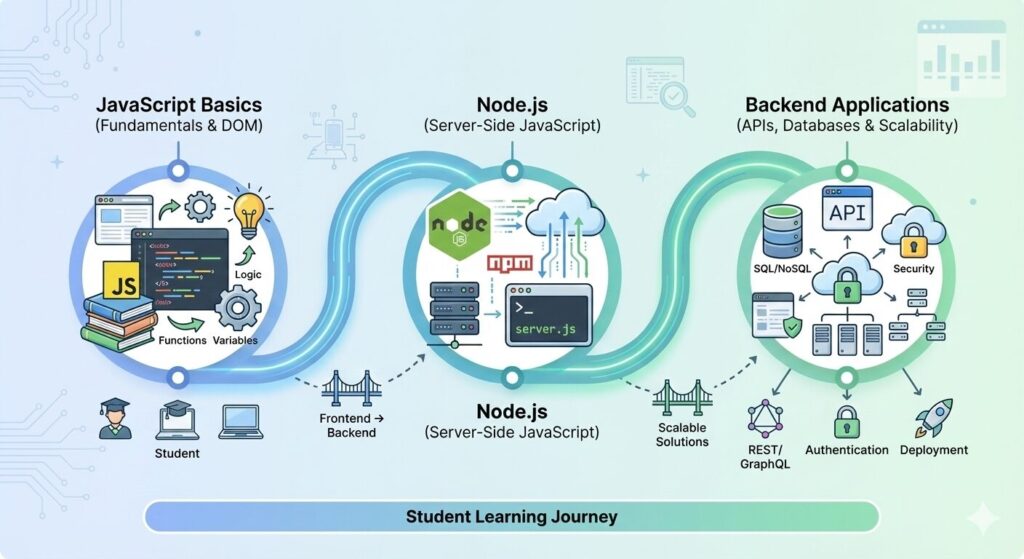
How to Run JavaScript Using Node.js Step by Step
Running JavaScript using Node.js is far less complicated than many beginners expect. Once Node.js is installed on your computer, you can execute JavaScript files directly without opening a browser. This ability is what makes JavaScript nodes so powerful, especially for backend development, automation, and learning how JavaScript works beyond web pages.
Here is a clear step-by-step breakdown to help beginners get started confidently.
- Install Node.js on your system
Visit the official Node.js website and download the recommended version for your operating system. The installer includes both Node.js and the Node Package Manager, often called npm. Once installed, you can confirm it is working by opening your terminal or command prompt and typing node -v. Seeing a version number means Node.js is ready. - Create a JavaScript file
Open any text editor or code editor and create a new file with a .js extension, such as app.js. This file will contain your JavaScript code. You can start with something simple, like logging text to the console or performing a basic calculation. - Write your first Node.js script
Inside your file, write a simple line of JavaScript. For example, you might log a message or add two numbers together. This code is no different from JavaScript you would write in a browser, which helps beginners feel comfortable quickly. - Run the file using Node.js
Open your terminal, navigate to the folder where your file is saved, and type node app.js. Press enter, and Node.js will execute the script immediately. The output appears directly in the terminal. This instant feedback loop allows learners to test ideas, make changes, and see results right away. - Understand built-in Node.js modules
One major advantage of JavaScript nodes is access to built-in modules. These modules allow your code to interact with files, directories, networks, and system processes. For example, Node.js can read or write files, start servers, and handle data streams. Beginners do not need to master these modules immediately, but knowing they exist helps explain Node.js’s power. - Use npm to extend functionality
Node Package Manager allows you to install additional tools and libraries created by the community. Over time, learners use npm to add frameworks, utilities, and testing tools to their projects. This ecosystem is one of the reasons Node.js is widely adopted.
The key to learning how to run JavaScript using Node.js is intentional practice. Start small, focus on understanding what each line of code does, and avoid jumping into complex frameworks too early. When learned gradually, JavaScript nodes become a practical and empowering way to work with JavaScript beyond the browser.
Conclusion
JavaScript has grown far beyond its original role in web browsers. Through JavaScript nodes and Node.js, it has become a full-stack language capable of powering entire applications. Understanding what JavaScript is, before learning how Node.js extends it, removes confusion and builds confidence.
This guide walked you through JavaScript fundamentals, explained JavaScript nodes clearly, and answered the most common beginner questions in a structured way. When learned patiently and correctly, JavaScript becomes a skill that opens doors rather than creates frustration.
Learning JavaScript is not about memorizing commands. It is about understanding how systems work and applying that understanding step by step.
Ready to Learn Javascript?
If you want to learn JavaScript with clarity, structure, and real-world guidance, Educify offers beginner and advanced JavaScript courses designed to build confidence and practical skill.






6 Responses