

Introduction
Starting your journey with JavaScript can feel overwhelming, but with the right javascript tips, you’ll be writing clean, efficient code in no time. Whether you’re a student at Educify learning to code for the first time or a parent helping your child understand programming concepts, these ten javascript tips and tricks will set you on the path to success. Let’s dive into the essential techniques that every beginner should master in 2026.
1. Master the Difference Between let, const, and var
One of the most important javascript tips for beginners is understanding how to declare variables properly. JavaScript offers three ways to declare variables: var, let, and const. While var was the traditional method, modern JavaScript development in 2026 emphasizes using let and const for better code quality and fewer bugs.
Use const when you’re declaring a value that won’t change, like a user’s name after they’ve logged in or a mathematical constant. Use let when you need a variable that will be reassigned, such as a counter in a loop or a user’s score in a game. The key difference is that const prevents reassignment, which helps catch errors early and makes your code more predictable.
Here’s a practical javascript tip: always default to const first. If you later realize you need to reassign the variable, then switch to let. This approach helps you write cleaner, more maintainable code that’s easier to debug.

2. Use console.log() Strategically for Debugging
Every developer’s best friend is console.log(), and learning to use it effectively is one of the most valuable javascript hacks you’ll discover. When your code isn’t working as expected, strategically placed console.log statements can help you understand what’s happening at each step of your program.
Don’t just log variables blindly. Instead, add descriptive messages to make debugging easier. For example, instead of console.log(userAge), try console.log("User age is:", userAge). This simple javascript tip makes it crystal clear what you’re looking at when reviewing your console output.
As you advance, explore other console methods like console.table() for displaying arrays and objects in a readable format, console.error() for highlighting errors, and console.warn() for warnings. These tools transform debugging from a frustrating experience into a manageable process.
3. Embrace Arrow Functions for Cleaner Code
Arrow functions are one of the most popular javascript tips and tricks that modern developers swear by. Introduced in ES6, arrow functions provide a shorter, cleaner syntax for writing functions. Instead of writing function add(a, b) { return a + b; }, you can write const add = (a, b) => a + b;.
This javascript hack not only saves typing but also makes your code more readable, especially when working with array methods or callbacks. Arrow functions automatically return the expression when you omit the curly braces, which is perfect for simple operations.
For Educify students just starting out, arrow functions might look strange at first, but they quickly become second nature. Practice converting your traditional functions to arrow functions, and you’ll soon appreciate their elegance and efficiency in your daily coding.
4. Learn Array Methods: map(), filter(), and reduce()
Understanding array methods is essential among javascript tips for anyone serious about programming. The trio of map(), filter(), and reduce() can handle most data transformation tasks you’ll encounter. These methods allow you to manipulate arrays without writing complex loops, making your code more declarative and easier to understand.
Use map() when you want to transform each element in an array. For instance, converting an array of numbers to their squares or extracting specific properties from objects. The filter() method creates a new array with elements that pass a test, perfect for finding all students above a certain grade or all products under a specific price.
The reduce() method might seem tricky at first, but it’s incredibly powerful for combining array elements into a single value. This javascript tip is perfect for calculating totals, finding maximums, or even flattening nested arrays. Mastering these methods will dramatically improve your code quality.

5. Understand Template Literals for Better Strings
Template literals are a game-changing javascript hack that makes working with strings infinitely easier. Instead of concatenating strings with plus signs, you can use backticks and embed variables directly with ${} syntax. This javascript tip transforms messy string concatenation into clean, readable code.
For example, instead of writing "Hello, " + userName + "! You have " + messageCount + " new messages.", you can write `Hello, ${userName}! You have ${messageCount} new messages.`. The difference becomes even more apparent with multi-line strings, which template literals handle effortlessly.
This is particularly useful for Educify students building interactive web applications where you need to display dynamic content. Template literals also preserve formatting, making them perfect for creating HTML templates or formatted output without complex escaping.
6. Practice Destructuring for Efficient Data Access
Destructuring is one of those javascript tips and tricks that seems magical once you understand it. This feature allows you to extract values from arrays or properties from objects into distinct variables in a single, elegant statement. Instead of accessing properties with dot notation repeatedly, destructuring lets you unpack them all at once.
For objects, you can write const { name, age, email } = user; instead of creating three separate variable assignments. For arrays, use const [first, second, third] = numbers; to grab specific elements. This javascript tip makes your code more concise and expressive.
Advanced destructuring even allows you to set default values, rename variables, and handle nested structures. As you progress in your Educify courses, you’ll find destructuring particularly useful when working with API responses or complex data structures.
7. Use Strict Equality (===) Instead of Loose Equality (==)
This javascript tip might seem simple, but it prevents countless bugs: always use === (strict equality) instead of == (loose equality). The difference is crucial because == performs type coercion, which can lead to unexpected results. For instance, "5" == 5 returns true because JavaScript converts the string to a number.
With strict equality (===), JavaScript checks both the value and the type, so "5" === 5 correctly returns false. This javascript hack helps you avoid subtle bugs that can be incredibly difficult to track down, especially when you’re comparing user input or data from different sources.
Make this a habit from day one of your programming journey. Your future self and anyone reviewing your code will thank you. This is one of the fundamental javascript tips that separates clean, professional code from error-prone amateur code.
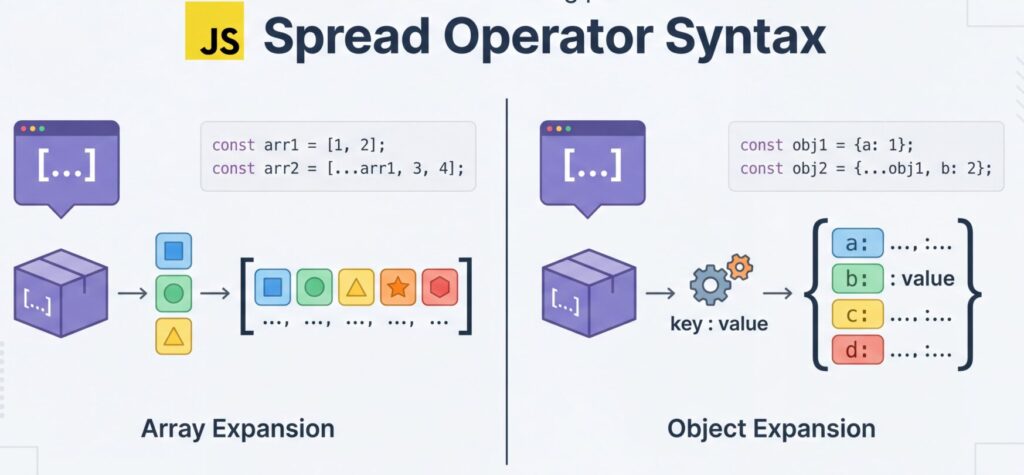
8. Leverage the Spread Operator for Array and Object Manipulation
The spread operator (...) is an incredibly versatile javascript hack that you’ll use constantly once you learn it. It allows you to expand arrays or objects in places where multiple elements or properties are expected. This javascript tip is perfect for combining arrays, creating copies, or passing array elements as function arguments.
For arrays, you can combine them with const combined = [...array1, ...array2]; or create a copy with const copy = [...original];. For objects, it’s equally powerful: const updated = { ...user, age: 30 }; creates a new object with all properties from user but with the age updated.
This is particularly useful at Educify when students learn about immutability and functional programming concepts. The spread operator helps you avoid mutating original data, which is a best practice in modern JavaScript development and essential for frameworks like React.
9. Understand Asynchronous JavaScript with async/await
As you advance in your JavaScript journey, understanding asynchronous programming becomes crucial. The async and await keywords are modern javascript tips that make handling asynchronous operations much more intuitive than traditional callbacks or even promises alone. This javascript tip is essential for working with APIs, databases, or any operation that takes time.
When you mark a function as async, it automatically returns a promise. Inside that function, you can use await to pause execution until a promise resolves, making asynchronous code read almost like synchronous code. For example, const data = await fetch(url); waits for the fetch to complete before continuing.
This javascript hack is particularly valuable for Educify students building real-world applications that need to fetch data from servers. Combined with try/catch blocks for error handling, async/await creates clean, maintainable code that’s easy to reason about and debug.
10. Comment Your Code and Use Meaningful Variable Names
The final and perhaps most underrated javascript tip is to write clean, self-documenting code. Use meaningful variable names that describe what they contain—userAge is infinitely better than x. This javascript hack costs nothing but makes your code dramatically more readable and maintainable.
Comments should explain why you’re doing something, not what you’re doing. The code itself should be clear enough to show what’s happening. Save comments for complex logic, business rules, or non-obvious solutions to specific problems. This javascript tip becomes increasingly important as you work on larger projects or collaborate with others.
At Educify, we emphasize that good coding habits start from day one. Writing clean code with proper naming conventions and helpful comments isn’t just about making your code easier to understand—it’s about developing professional habits that will serve you throughout your programming career.
Check out related articles on web development:
Conclusion
These ten javascript tips provide a solid foundation for your programming journey. From understanding variable declarations to mastering asynchronous code, each javascript hack builds upon the last to create a comprehensive skill set. Remember that becoming proficient in JavaScript is a marathon, not a sprint—consistent practice and building real projects will accelerate your learning far more than passive study.
The javascript tips and tricks covered here are just the beginning. As you continue learning, you’ll discover countless more techniques and best practices. Stay curious, keep experimenting, and don’t be afraid to make mistakes—they’re your best teachers. With dedication and the right guidance, you’ll transform from a beginner into a confident JavaScript developer.
Ready to master JavaScript with expert guidance? Learn with Educify’s top tutors today and accelerate your coding journey!